- Day 1: Setting Up Your Study OS
- Day 2: The Research Revolution
- Day 3: Mastering NotebookLM (Current)
- Day 4: Field-Specific Power Moves
- Day 5: Writing with Integrity
- Day 6: Career Jumpstart
- Day 7: Personal AI Agents
There is a moment nearly every serious student hits, and it usually arrives without warning.
You open the week’s reading list and realize it is not one chapter. It is four chapters, two lecture decks, a journal article, a professor’s notes, and a case packet dense enough to make your eyes blur. You tell yourself you will “catch up tonight.” Then tonight becomes tomorrow, and tomorrow becomes the quiet panic of trying to learn in three hours what was designed to be absorbed over five days.
That is where a lot of AI advice goes wrong. It tells students to “use AI for studying” as if the problem were simply speed. But speed is not the real issue. The real issue is overload. Students do not just need a chatbot that can answer random questions. They need a system that can think with their actual materials.
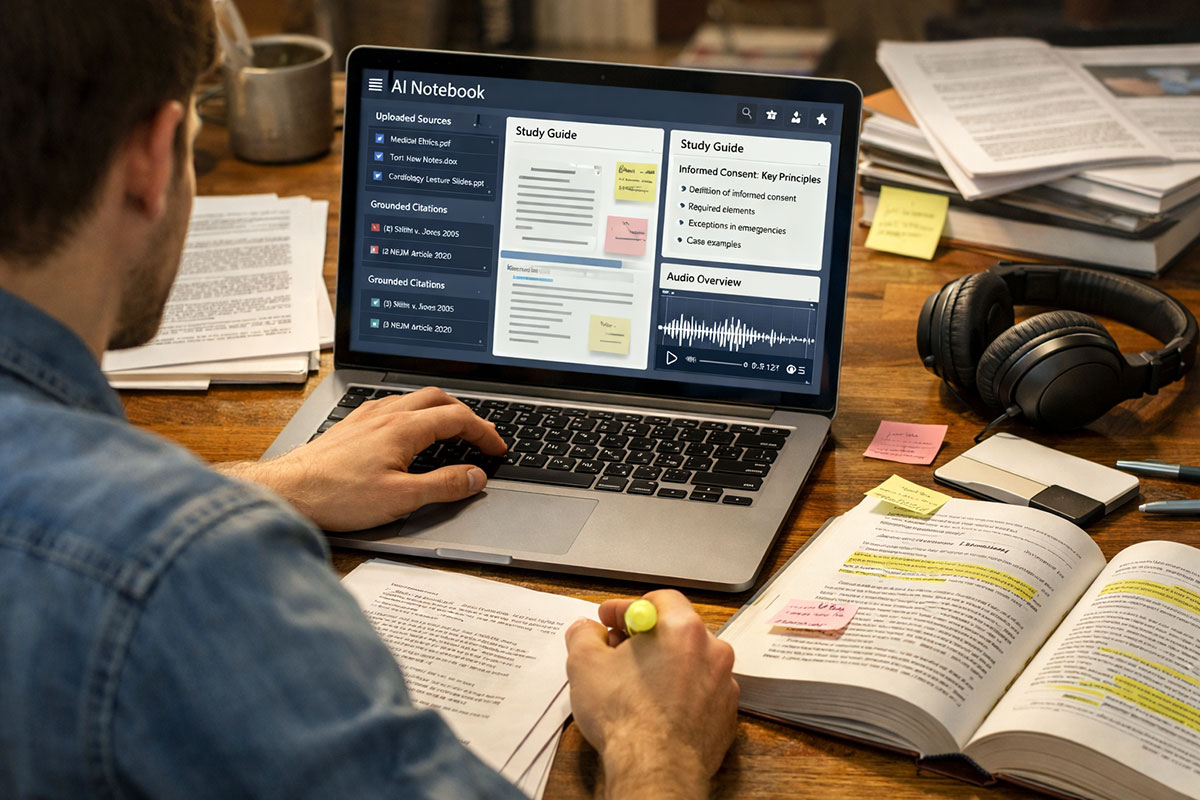
That is what makes Google NotebookLM interesting. Instead of asking a general model to guess what your professor meant, you upload your syllabus, slides, PDFs, notes, and readings into a notebook built around your course sources. NotebookLM is designed to answer from those materials, with inline citations, which makes it fundamentally different from the vague, generic chat experience many students are used to. Google’s official materials describe it as a research and learning assistant that can work across sources like PDFs, Docs, Slides, websites, YouTube links, and more, while grounding responses in the uploaded material.
And then there is the feature students instantly understand: Audio Overviews. Dense material becomes a conversational audio discussion you can listen to while commuting, walking, or resetting your brain after hours of reading. Google notes that these AI-generated audio discussions are built from your sources and are meant to help users understand complex material in a more accessible format.
If normal AI chat feels like asking a smart stranger for help, source-grounded AI feels like building a private tutor that has actually done the reading.
In Day 2 of this series, we covered why research quality matters and why verifiable citations change the game. This is the natural next step. Once you have better sources, you need a smarter way to organize, interrogate, and revisit them. That is where NotebookLM starts to feel less like a novelty and more like academic infrastructure.
Table of Contents
- Why NotebookLM Feels Different from Basic AI Chat
- How to Turn a Messy Syllabus into a Study Intelligence System
- Why Audio Overviews Matter More Than They First Appear
- Real-Life Scenario: The Overwhelmed Law or Medical Student
- The Risks, Limits, and Smart Boundaries Students Should Respect
- FAQ: Using NotebookLM Without Becoming Dependent on It
Why NotebookLM Feels Different from Basic AI Chat
Most students first encounter AI through a blank chat box. That experience can be useful, but it also creates a subtle bad habit: asking broad questions without building a reliable context. The model responds confidently, the student gets something that sounds polished, and everyone moves on. But was the answer aligned with the assigned reading? Did it reflect the professor’s framing? Did it miss a nuance buried in slide 42 or in a footnote of the casebook? Too often, yes.
NotebookLM changes the starting point. You do not begin with a general prompt. You begin with sources. That matters more than it seems.
Google says NotebookLM supports a range of source types, including PDFs, Google Docs, Google Slides, web URLs, public YouTube videos, pasted text, audio files, and more, with notebooks that can include up to 50 sources and large per-source limits. That means a student can build a notebook that looks much more like a real course: syllabus, weekly lecture slides, assigned readings, past review notes, a key paper, and maybe a transcript from a guest lecture. Suddenly, the AI is not speaking from the entire internet. It is speaking from your academic stack.
That makes NotebookLM especially powerful for students who want to study faster without turning their brains off. In our related piece on study workflows that help students move faster without cheating, the core idea was not “skip the work.” It was “reduce friction around the work.” NotebookLM fits that philosophy almost perfectly. It helps you get to the important concepts faster, but it does so by staying anchored to the material you were supposed to engage with anyway.
There is also a psychological advantage here. Students often avoid hard reading because the first pass feels punishing. The vocabulary is dense. The structure is unfamiliar. The text gives nothing away easily. A grounded notebook gives you gentler entry points: summarize this section in plain English, explain the difference between these two terms, quiz me only on what appears in the uploaded lecture deck, show me where the source supports that conclusion.
That last part is crucial. Inline citations and direct grounding are not just technical features. They are confidence features. They let students verify instead of merely trust. And in education, that difference matters.
| Study Approach | What It Does Well | Where It Breaks Down |
|---|---|---|
| Generic AI chat | Fast brainstorming, simple explanations, drafting questions | May drift away from your actual syllabus or invent context |
| Manual note-taking only | Deep engagement, personal recall, strong comprehension | Slow, tiring, hard to scale across heavy reading loads |
| NotebookLM with course sources | Grounded summaries, source-based Q&A, citations, study guides, audio learning | Still requires judgment, verification, and active learning habits |
How to Turn a Messy Syllabus into a Study Intelligence System
Here is where students usually miss the opportunity. They treat NotebookLM as a one-off tool instead of a semester-long system.
The better approach is to build one notebook per course or one notebook per major unit, depending on how intense the class is. Start with the syllabus. Not because the syllabus is exciting, but because it quietly tells you what the course thinks matters. It reveals themes, grading logic, weekly reading structure, assignment timing, and often the professor’s actual language. Once that is in the notebook, add lecture slides, required readings, unit handouts, and any rubric-heavy assignment documents.
Now you are not merely uploading files. You are building a map.
From there, your prompts should become more strategic. Do not ask, “Summarize everything.” Ask smarter questions.
- What concepts show up repeatedly across the syllabus and the first three lecture decks?
- Create a study guide based only on the uploaded sources for Unit 1.
- What seems most likely to appear on an exam based on emphasis and repetition?
- Explain this topic as if I am encountering it for the first time, but cite the course materials.
- Quiz me on weak areas from these slides and readings, one question at a time.
That is the shift: from passive summarization to active navigation.
Google also highlights built-in artifact creation such as study guides, briefing documents, and FAQs derived from your sources. For students, this can be incredibly practical. A lecture deck can become a quick revision guide. A pile of assigned readings can become a concept map. A messy bundle of sources can become a list of recurring themes.
There is a hidden benefit here too. When students build notebooks carefully, they create continuity across the semester. That matters because academic struggle is often a memory problem, not an intelligence problem. Students forget what they read two weeks ago, fail to connect it with what they learned yesterday, and then blame themselves. NotebookLM can surface those connections more quickly.
Still, do not confuse “organized” with “understood.” A notebook is not a substitute for grappling with the material. It is a force multiplier for that grappling. This is also where the broader debate becomes worth taking seriously. In our article on whether AI in universities makes students smarter or more passive, the central question was not whether AI exists. It was whether students use it to deepen thought or bypass it. NotebookLM can serve either impulse. The difference lies in how you use it.
The healthiest use of AI in education is not outsourcing your thinking. It is reducing the mechanical drag that keeps you from thinking well.
A practical weekly routine helps. Try this:
- Upload new lecture slides and assigned readings at the start of the week.
- Ask for a “what matters most this week?” summary grounded in the syllabus and new sources.
- Generate a study guide before your first review session.
- Use chat for clarification on confusing terms or comparisons.
- Generate quiz questions before class, not just before exams.
- At week’s end, ask for a recap of the top concepts and unresolved gaps.
That one habit can save students from the classic disaster of reaching week eight with a hard drive full of files and no actual study structure.
Why Audio Overviews Matter More Than They First Appear
At first glance, Audio Overviews can sound like a gimmick. A study podcast? Really? For serious academic work?
But that reaction usually comes from people who have never had to absorb hundreds of pages while juggling labs, commuting, part-time work, or emotional exhaustion. Students do not always need more content. Often, they need more entry points into the content.
Google introduced Audio Overviews as AI-generated conversations built from your notebook’s sources, designed to help users understand complex material in a more engaging format, and notes that the audio can even be downloaded for listening on the go. That is not a trivial feature. It means dense, intimidating material can become something you can revisit while walking to class, riding a bus, doing chores, or mentally resetting after a long reading block.
For many students, comprehension improves when material is encountered in more than one format. Reading alone can become visually exhausting. Listening alone can become passive. But reading plus listening, especially when both are anchored to the same source set, can improve familiarity and retention. The audio overview is not replacing the text. It is lowering the resistance that keeps students from returning to the text.
That is especially useful for courses that involve layered understanding. Think anatomy, constitutional law, economic theory, philosophy, biology, or literary criticism. These subjects are not hard only because they are detailed. They are hard because they ask students to hold multiple concepts in working memory at once. A conversational audio explanation can make relationships between ideas feel less abstract.
Still, there is a smart way to use this feature. Do not treat the audio as your final authority. Treat it as the bridge between overwhelm and deeper study. Listen first, then go back and interrogate the notebook. Ask it to define terms more precisely. Ask it to compare frameworks. Ask it to point you to the exact passage behind a claim. Use the podcast-like overview as the warm-up, not the exam itself.
This is where NotebookLM becomes more than a note-taker. It becomes a study environment. Not perfect, not magical, but practical in a way many AI products are not.
Real-Life Scenario: The Overwhelmed Law or Medical Student
Imagine a second-year law student named Aisha, though the same pattern could apply to a medical student buried in pathology or pharmacology.
It is Tuesday night. By Friday, she is expected to complete more than 500 pages across case law, commentary, lecture notes, and statutory reading. She is not lazy. In fact, that is part of the problem. She tries to read everything line by line, highlight carefully, and handwrite notes because that is what “good students” are supposed to do. By week four, she is behind. By week six, she is reading in a state of low-level panic. Information stops sticking because her brain has switched from learning mode to survival mode.
This time, she tries something different.
She builds a NotebookLM notebook for one subject. She uploads the syllabus, this week’s cases, professor slides, and a difficult review article. First, she asks for a grounded overview of the week’s core themes. Then she generates an Audio Overview and listens to it on her commute the next morning. Instead of meeting the reading cold, she arrives with a rough mental map: these three cases revolve around a conflict between principle and application; this doctrine is likely to matter; this professor keeps returning to one procedural distinction.
That evening, she does not skip the reading. She reads it differently. She is not searching blindly anymore. She knows what to look for. When a confusing phrase appears, she asks NotebookLM to explain it using only the uploaded materials. When she reaches a difficult comparison, she asks the notebook to contrast the two cases and cite the relevant passages. Before bed, she asks for five quiz questions based strictly on the week’s sources.
By the end of the week, something important has changed. She has not eliminated effort. She has made effort more intelligent.
A medical student could do something similar with lecture slides, textbook excerpts, and a treatment guideline. Listen to the audio summary before rounds. Use chat to test understanding of differential diagnoses strictly from the uploaded material. Generate a review guide before a lab session. Instead of treating the week’s reading pile as a wall, use the notebook to create doors.
That is what good AI use looks like in education. Not “How do I avoid reading?” but “How do I make reading survivable, structured, and useful again?”
The Risks, Limits, and Smart Boundaries Students Should Respect
No serious article about educational AI should pretend there are no downsides.
NotebookLM is powerful precisely because it reduces friction. But anything that reduces friction can also reduce struggle, and some struggle is where learning happens. If students overuse summaries, skip primary engagement, or treat audio overviews as a substitute for close reading, they may feel productive while actually weakening their depth of understanding.
Google itself notes that generated audio discussions are not comprehensive or objective views of a topic, but reflections of the sources uploaded into the notebook. That warning matters. If your sources are incomplete, biased, shallow, or poorly chosen, your notebook may feel reliable while still giving you a narrow picture. Source-grounded does not mean automatically complete. It means grounded in what you provided.
There is also the issue of dependency. If students become so used to AI-generated study aids that they stop building their own summaries, they may lose a valuable cognitive habit. Handwritten or self-generated synthesis still matters. So does the friction of wrestling with ambiguity. AI should compress the busywork around learning, not erase the hard thinking inside learning.
A balanced view looks like this:
- Pros: better organization, faster entry into dense material, grounded Q&A, improved revision, more flexible learning formats, reduced overwhelm.
- Concerns: passive consumption, overreliance on summaries, false sense of mastery, weak source selection, temptation to skip original texts.
The safest rule is simple. Use NotebookLM for orientation, clarification, review, and structured recall. Do not use it as a replacement for every first encounter with serious material. Some readings still deserve to be read slowly, directly, and without mediation.
And students should understand limits too. Official NotebookLM documentation lists caps around notebooks, sources, per-source size, and daily free-tier usage. Those limits are not just technical fine print. They encourage selectivity. The best notebook is not the one with every file you have ever downloaded. It is the one with the right files, cleanly organized, used with intention.
FAQ: Using NotebookLM Without Becoming Dependent on It
1. Is NotebookLM better than asking questions in a normal AI chatbot?
For course-based study, often yes, because the value is not just intelligence but grounding. A normal chatbot may produce impressive explanations, but it does not automatically know your syllabus, your professor’s framing, or the exact materials you were assigned. NotebookLM starts from a different place: the sources you upload. That makes it far more useful when the goal is not vague understanding, but understanding this course accurately. That said, “better” depends on your purpose. If you want brainstorming, quick writing help, or broad comparisons across topics, a general chatbot can still be useful. If you want your study process rooted in actual readings and slides, NotebookLM has a real advantage. The strongest students will often use both, but for different purposes and with clear boundaries.
2. Can I really trust NotebookLM not to hallucinate?
You should trust it more than a generic system when it is working from your uploaded sources, but not blindly. Source grounding reduces the chance of fabricated claims because the tool is designed to respond from the notebook’s materials and can provide inline citations. Still, reduction is not elimination. You should verify important claims, especially when preparing for graded assignments, exams, or professional programs where nuance matters. The right mindset is not “AI cannot be wrong here.” It is “AI is more useful when it can show me where its answer comes from.” That is a much healthier academic posture. The citation trail is part of the learning process, not just a technical add-on.
3. Will using Audio Overviews make me lazy?
It can, if you use them as a substitute for engaging with the material. But it can also do the opposite. For many students, the hardest part of a heavy reading load is simply getting traction. When a dense topic first feels accessible in audio form, students may become more willing to revisit the original texts with less fear and more curiosity. That is not laziness. That is scaffolding. The danger appears when the audio becomes the endpoint instead of the doorway. A good rule is this: listen first for orientation, then read for precision, then use chat for clarification, then test yourself without help. That sequence keeps you active rather than passive.
4. What kinds of students benefit most from NotebookLM?
Students in reading-heavy, concept-heavy, or documentation-heavy fields may feel the difference fastest. Law, medicine, public policy, psychology, history, business, literature, and social sciences all involve large volumes of material that can become hard to organize mentally. But STEM students can benefit too, especially when using NotebookLM to synthesize lecture slides, lab notes, methodology explanations, or research articles. It is also useful for students who commute, work part-time, or struggle to maintain consistency because audio and structured summaries make review more flexible. The common thread is not major. It is cognitive load. The more scattered or dense your study inputs are, the more valuable a source-grounded notebook can become.
5. Should I upload everything from a course into one notebook?
Not always. More is not automatically better. A notebook overloaded with loosely related materials can become messy, especially if you are trying to use it for precise review. In many cases, one notebook per course works well, especially if the course is coherent and not too sprawling. For more intense classes, you may want one notebook per unit, exam block, or theme. The goal is not archive completeness. The goal is usable structure. Think like an editor, not a hoarder. Include the syllabus, core readings, slides, and only the most relevant supporting documents. A clean notebook can outperform a huge chaotic one because better source selection leads to better questions and clearer answers.
6. How do I use NotebookLM without weakening my own note-taking skills?
Keep one part of the process stubbornly human. After using NotebookLM to generate a summary or explain a concept, rewrite the key idea in your own words. Build your own mini-outline after listening to an audio overview. Answer quiz questions before asking the notebook to explain the answer. These habits preserve the synthesis work that actually develops understanding. Think of NotebookLM as a preparation layer and feedback layer, not your only layer. It helps you enter the material faster and revisit it more intelligently, but your own paraphrasing, comparison, retrieval, and reflection still matter. The students who gain the most from AI are rarely the ones who outsource everything. They are the ones who know exactly what not to outsource.
NotebookLM is not the future of studying by itself. But it does point toward something important: the most useful AI tools in education will not be the ones that sound the smartest in a blank box. They will be the ones that help students work directly with real materials, real context, and real constraints.
And that is why Day 3 matters. Day 1 was about building your study operating system. Day 2 was about finding research you can trust. Day 3 is about turning that pile of readings, slides, and documents into something you can actually use before the semester uses you up.
Pro Tip: Now that you have your Study OS built, your research verified, and your notes transformed into personal podcasts, it's time to get specific. In Day 4 of this series, we will break down the “Field-Specific Power Moves”—showing you the exact AI tools you need whether you are majoring in Computer Science, Humanities, Business, or the Arts. Field-Specific Power Moves
About the Author
Girish Soni is the founder of TrendFlash and an independent AI strategist covering artificial intelligence policy, industry shifts, and real-world adoption trends. He writes in-depth analysis on how AI is transforming work, education, and digital society. His focus is on helping readers move beyond hype and understand the practical, long-term implications of AI technologies.