Day 1: Building Your Professional OS (Current)
Day 2: The Digital Intern Fleet
Day 3: The Deep-Work Shield
Day 4: Executive Intelligence
Day 5: Agentic Networking
Day 6: The Human-Plus Moat
Day 7: The Career Agent Launch
You can feel the shift now, can’t you?
A few years ago, using AI at work made you look early. Then it became useful. Then normal. Now we are entering a harsher phase: AI is no longer impressive just because you opened a chat window and asked for a summary. The real advantage is moving from casual use to deliberate orchestration.
That is the difference between someone who “uses AI” and someone who works through an AI-backed operating model.
Most professionals are still stuck in the first mode. They treat AI like a smarter search engine, a faster copywriter, or a polite assistant that appears only when summoned. But top performers are quietly building something deeper: a persistent layer of instructions, memory, context, and workflow logic that turns AI into a reliable partner across their entire week.
That is your Professional OS.
Think of it as the invisible system that sits behind your meetings, documents, decisions, and priorities. It knows how you think. It understands your standards. It can pull from your own knowledge base, not just the open web. It can evaluate choices against your goals before they even hit your screen. And if that sounds like overkill, consider the alternative: professionals who still work one prompt at a time may soon find themselves competing against people who have effectively built a second brain with process discipline.
“The next career divide will not be between people who use AI and people who reject it. It will be between people who improvise with AI and people who architect their work around it.”
This matters beyond productivity. As TrendFlash argued in Mass Unemployment vs. the “Human-Plus” Era, the strongest defense against automation is not denial. It is becoming the person who can command systems, reduce ambiguity, and redesign work around human judgment. That is exactly what a Professional OS helps you do.
Table of Contents
- What a Professional OS actually is
- Permanent instructions: the layer most people skip
- Your personal knowledge base: why RAG changes the game
- Building a digital twin for decision support
- Risks, guardrails, and the path to leadership
- FAQ: practical questions professionals ask
What a Professional OS actually is
Let’s start by clearing away the hype. A Professional OS is not a single app. It is not one chatbot, one prompt library, or one shiny dashboard. It is a working architecture.
At minimum, it has four layers. First, it has persistent instructions: rules that tell AI how to think with you, not just how to answer you. Second, it has a knowledge layer: your documents, meeting notes, playbooks, templates, and historical context. Third, it has a workflow layer: repeatable automations for the tasks that consume your week. Fourth, it has a decision layer: logic that checks ideas, drafts, and requests against your goals before you act.
That shift matters because chat-based AI is stateless by default. You ask, it answers, and then too much of the professional context disappears unless you design continuity into the system. OpenAI’s custom instructions are one example of how persistent guidance can be applied across chats, while custom GPTs combine instructions, knowledge, and capabilities into tailored assistants.
So the question is not, “Can AI help me with this one task?” The better question is, “What repeatable decisions, standards, and context should AI carry for me every day?”
That is when work starts to feel different.
Your meeting prep becomes more structured. Your writing becomes more consistent. Your planning becomes less reactive. Your review process gets sharper because your system can compare output against the principles you have already defined. Suddenly, AI is not just generating language. It is enforcing operating discipline.
If this idea feels familiar, it should. Students are already learning a version of it in our earlier foundation piece, Beyond the Chatbox: Setting Up Your AI Study OS. The professional version is simply more demanding. The stakes are no longer grades or note-taking. They are reputation, leverage, speed, judgment, and eventually leadership.
And yes, leadership is where this ends up. TrendFlash’s CAIO analysis makes the point plainly: organizations are moving beyond dabbling and treating AI as an operating system for the enterprise, not a side experiment. Building your own Professional OS is the personal-career version of that same shift.
Permanent instructions: the layer most people skip
If most people are underusing AI, this is where it shows first. They open a blank chat and re-explain themselves every time. Tone. goals. audience. formatting. constraints. brand voice. risk appetite. what “good” looks like. They do this over and over, then wonder why AI feels inconsistent.
That is not an AI problem. That is an operating system problem.
Persistent instructions solve part of it. OpenAI describes custom instructions as a way to tell ChatGPT what you want it to consider in every response, and its guidance on instruction writing emphasizes clarity, step separation, and specificity.
In practice, this means your Professional OS should have a “constitution.” Not a vague paragraph about being helpful. A real instruction stack.
| Layer | Weak AI Use | Professional OS Approach |
|---|---|---|
| Identity | “Help me write this email” | “Act as my strategic communications partner for enterprise marketing, with a bias toward clarity, brevity, and executive relevance.” |
| Standards | Re-explain preferences every time | Store default tone, structure, red lines, approval thresholds, and formatting rules persistently. |
| Context | AI only sees the current prompt | AI can reference team plans, project docs, previous decisions, and KPI frameworks. |
| Decision support | AI generates options | AI filters options against goals before recommending action. |
What belongs inside this instruction layer?
- Your role and responsibilities
- Your recurring goals for the quarter or year
- Your preferred communication style
- The audiences you write for most often
- The mistakes AI should avoid in your field
- The questions AI should ask itself before responding
Here is the practical insight many professionals miss: good instructions do not just shape wording. They shape judgment. You can tell your system to flag weak assumptions, distinguish facts from inference, surface trade-offs, or resist overconfident recommendations. That moves AI from “draft generator” toward “professional thinking scaffold.”
“A prompt asks for an answer. An instruction system defines a standard.”
And standards compound. Once your AI knows how you want strategy memos framed, how you assess risk, how you summarize meetings, and what counts as a useful recommendation, every future interaction starts stronger. The result is not magical. It is managerial. But that is exactly why it works.
Your personal knowledge base: why RAG changes the game
Now we get to the layer that separates toy usage from serious leverage: retrieval.
Large language models are powerful, but they do not automatically know your company’s quarterly priorities, your personal templates, your product history, or the lessons buried in last year’s meeting notes. That is where a personalized knowledge base comes in. The formal term most people hear is retrieval-augmented generation, or RAG.
The original RAG research framed the idea simply: combine a language model with an external knowledge store so the system can retrieve relevant information instead of relying only on what is baked into model parameters. That approach improves access to explicit knowledge and makes updates easier than retraining a model every time your information changes. Later reviews of RAG emphasize the same advantage: better credibility, fresher knowledge, and stronger domain-specific responses.
In plain English, this means your Professional OS should not depend on AI “remembering” everything. It should be able to look things up from your own world.
What belongs in that knowledge base?
- Meeting transcripts and summaries
- Strategy docs and annual plans
- Approved messaging and brand guidelines
- Customer research, FAQs, and objections
- Past campaign reports and performance reviews
- Templates, SOPs, and decision logs
This is where professionals often overcomplicate things. Your first version does not need a fancy vector database and a six-tool automation stack. It can begin with a curated folder system, clean naming conventions, a transcript archive, and one retrieval-capable workspace or assistant that can search across that material reliably.
What matters most is not technical purity. It is signal quality.
If your knowledge base is full of stale drafts, duplicate files, and bad notes, your Professional OS will inherit that mess. If it contains high-quality source material, AI becomes dramatically more useful. It can summarize a project using the actual history. It can answer questions from real documentation. It can compare new proposals with previous commitments. It can help you think with evidence instead of vibe.
That single change reduces a lot of professional friction. Fewer repeated explanations. Fewer context-switches. Fewer decisions made from memory alone. In a noisy environment, retrieval is not just a technical upgrade. It is a sanity upgrade.
Building a digital twin for decision support
This is the part that sounds futuristic until you realize you probably need it already.
The term digital twin originally comes from engineering and operations. McKinsey describes a digital twin as a virtual replica of an object, person, or process that can be used to simulate behavior and improve understanding, while IBM similarly frames it as a dynamic virtual representation linked to real data.
For a knowledge worker, your digital twin is not a perfect clone of your personality. It is a decision-support model of how you operate.
It should know things like:
- What your current priorities are
- What trade-offs you usually accept or reject
- What metrics actually matter to you
- How you escalate issues
- What “good enough” means in different situations
- When to optimize for speed versus precision
Once those patterns are encoded, AI can do more than summarize. It can pre-screen work. It can say, “This draft sounds polished, but it does not support the quarter’s retention goal.” Or, “This meeting request looks useful, but it conflicts with your deep-work blocks and has no clear decision objective.” Or, “This campaign idea is creative, but it repeats last quarter’s underperforming angle.”
That is when AI starts behaving less like a clever assistant and more like a strategic filter.
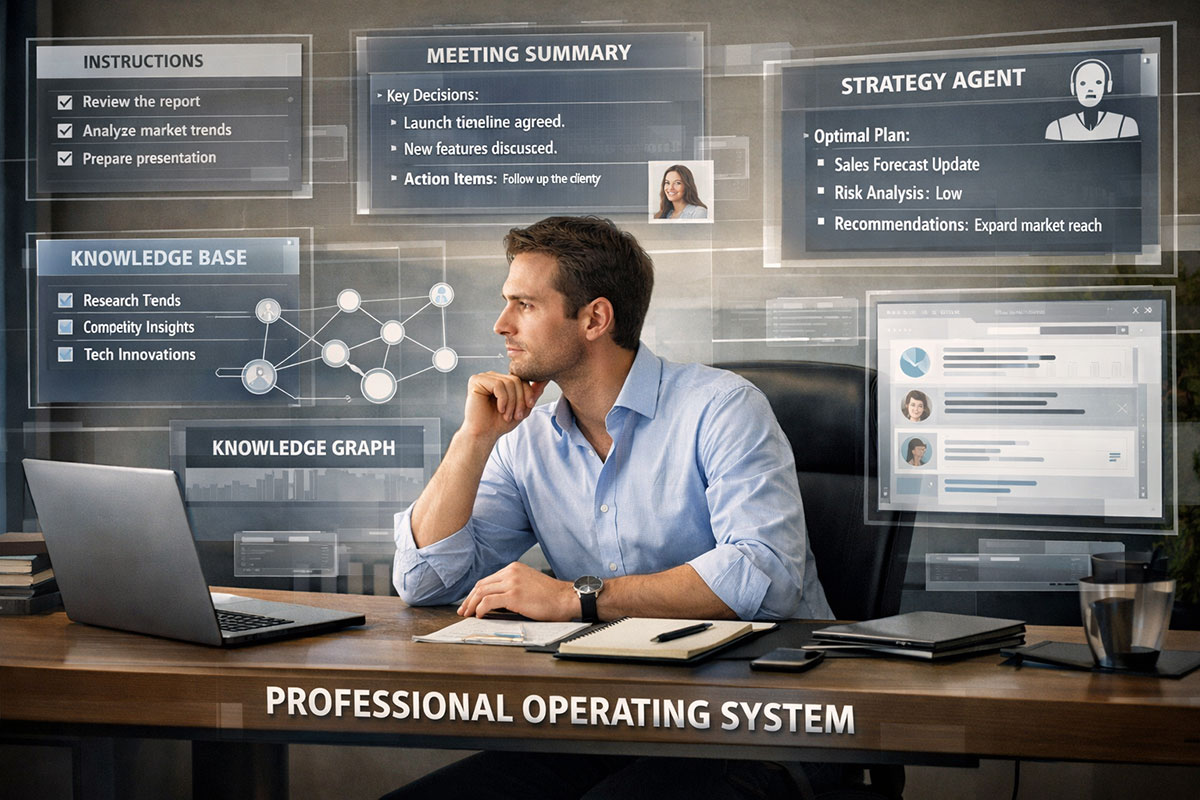
Consider the mid-level marketing manager from our scenario. She was managing 500-plus emails, sitting through roughly 15 hours of meetings a week, and spending evenings just trying to reassemble what mattered. Her first breakthrough was simple: every meeting was transcribed, summarized, tagged, and stored in a searchable knowledge base. Her second breakthrough was bigger. She created a “Strategy Agent” trained on her annual KPIs, approved messaging pillars, campaign scorecards, and leadership expectations.
Now, before a project reached her live attention, the agent checked whether it supported pipeline growth, whether it fit the brand, what risks it introduced, and which stakeholder questions were likely to emerge. Instead of walking into Monday already behind, she opened a dashboard with ranked priorities, key decisions, and suggested next moves.
Did this eliminate her judgment? Not at all. It preserved it.
That is the hidden value of a digital twin. It does not replace your thinking. It protects your thinking from being buried under repetition, recall failure, and administrative noise.
And once you start operating this way, you begin to look different inside an organization. You are not just responsive. You are system-minded. That is exactly the sort of shift that points toward more senior roles, including the kinds of AI leadership positions explored in TrendFlash’s piece on the rise of the CAIO.
Risks, guardrails, and the path to leadership
Let’s be honest: a Professional OS is powerful, but it is not harmless by default.
If you feed bad data into the system, it will scale bad judgments faster. If you over-trust summaries, you can miss nuance. If you centralize sensitive information carelessly, you create privacy and compliance risks. And if you let AI become your default thinker instead of your thinking partner, your own judgment can start to soften.
So yes, there are real concerns here.
The upside is obvious. Better continuity. Better prioritization. Better memory. Faster synthesis. Stronger consistency across writing, planning, and execution. A well-designed Professional OS can reduce busywork while increasing the quality of your judgment surfaces.
The downside is subtler. You can become dependent on a system you do not audit. You can confuse polished recommendations with correct ones. You can accidentally build a machine for reinforcing your own biases if the instruction layer is too narrow or self-flattering.
That is why every Professional OS needs guardrails.
- Separate confidential, internal, and public material clearly
- Require source checks for important recommendations
- Ask AI to distinguish evidence from inference
- Review summaries of high-stakes meetings manually
- Refresh knowledge bases so stale assumptions do not linger
- Build “disagree with me if needed” into your instruction layer
Professional OS checklist:
- Define your role, priorities, and standards in persistent instructions
- Create one trusted folder or workspace for core documents
- Store meeting notes in a searchable format
- Build one repeatable automation before trying ten
- Design a simple review agent around your KPIs
- Set privacy rules before expanding the system
- Audit outputs weekly for drift, hallucination, or blind spots
This is also where the career angle becomes unavoidable. Building a Professional OS is not merely a productivity hack. It is training for a new class of work. The Human-Plus future is not about looking busy beside automation. It is about becoming the person who orchestrates systems, handles exceptions, sets guardrails, and translates goals into workflows. TrendFlash’s workforce analysis argues that the decisive advantage will belong to those who can command AI systems rather than be passively shaped by them.
In other words, the Professional OS is not the finish line. It is your entry point into a higher-value identity.
FAQ: practical questions professionals ask
1) Do I need advanced technical skills to build a Professional OS?
No. That is one of the biggest misconceptions stopping smart people from starting. You do not need to become a machine learning engineer, build custom infrastructure from scratch, or understand every technical detail behind retrieval systems. What you do need is systems thinking. You need to know where your information lives, what your repeatable tasks are, how decisions get made, and what standards matter in your role.
For most professionals, version one is surprisingly practical. Start with a well-written instruction set, a clean archive of your key documents, a consistent method for capturing meeting notes, and one assistant or workflow that can retrieve from those materials. That alone will put you ahead of most people who are still improvising from blank chats every day.
The technical layer can evolve later. You can add smarter retrieval, more structured automations, and more specialized agents over time. But if you wait for the perfect tool stack before changing how you work, you will waste months. The right sequence is simpler: first design the operating logic, then improve the tooling around it.
2) What is the first workflow I should automate?
Choose the workflow that drains you repeatedly but still follows a recognizable pattern. For many professionals, that is meeting synthesis. Meetings are relentless, expensive, and oddly fragile. Key decisions get buried, action items get lost, and context disappears across threads and calendars. When you automate capture, summary, and storage, you are not just saving time. You are creating memory.
Other good first workflows include inbox triage, first-draft brief writing, weekly planning, project status summaries, and document comparison. But meeting synthesis is often the best starting point because it touches almost everything else. It feeds the knowledge base, improves retrieval, and gives your eventual digital twin something concrete to reason over.
The rule is simple: automate where repetition is high and judgment requirements are moderate. Do not begin with the most politically sensitive or complex decision in your week. Begin where structure already exists and the costs of experimentation are low.
3) How is a Professional OS different from just using one really good prompt?
A good prompt is a moment. A Professional OS is an environment.
Prompts are useful, of course. They are still part of the toolkit. But on their own, they are fragile. They rely on you remembering context, retyping standards, and rebuilding logic each time. That means your quality varies with your energy, your time pressure, and your memory. In other words, the system is still mostly you.
A Professional OS reduces that volatility. It stores your standards persistently. It connects your AI to relevant materials. It creates repeatable workflows. It builds a decision layer that reflects your real priorities. Instead of asking, “Can I get a good answer right now?” you start asking, “How do I design a reliable way of working so the good answer is easier to produce every time?”
That difference becomes enormous over months. One good prompt can save an hour. A real operating system can reshape how you work every week.
4) Can building a digital twin make my work feel less human?
Only if you build it badly.
The purpose of a digital twin in professional work is not to flatten your judgment into a template or turn you into a machine. It is to protect what is uniquely valuable about your judgment by clearing away the noise that prevents you from using it well. The twin should handle pattern recognition, pre-screening, retrieval, and structured review. You should still own the final call, the ethical line, the political nuance, and the genuinely creative leap.
In fact, many people find the opposite happens. Once repetitive synthesis and context assembly are offloaded, they have more mental space for the truly human parts of work: persuasion, coaching, reframing, empathy, strategic timing, and imagination. The system becomes less about automating you and more about preserving your best cognition for the moments that deserve it.
The real danger is not dehumanization. It is unexamined delegation. Keep the high-stakes judgment with the human, and the system becomes an amplifier rather than a substitute.
5) What are the biggest mistakes people make when building this kind of system?
The first mistake is chasing complexity too early. People want an ecosystem of agents, automations, vector databases, and dashboards before they have even written down their core instructions clearly. That leads to impressive-looking chaos. The second mistake is feeding the system disorganized, low-trust material. Retrieval only works well when the underlying information is actually worth retrieving.
The third mistake is forgetting governance. Professionals get excited by speed and overlook privacy, review processes, and data boundaries. That can create real problems, especially in client work, internal strategy, or regulated environments. The fourth mistake is failing to audit the system. AI outputs drift. Priorities change. What worked last quarter may quietly become misleading this quarter.
The fix is not glamorous. Start narrower. Curate better. Review regularly. A Professional OS should feel boring in the best sense: dependable, explainable, and genuinely useful.
6) How does this connect to long-term career growth?
This is where the topic becomes much bigger than productivity. Building a Professional OS trains you to think like an orchestrator. You begin to see work as flows, decisions, dependencies, and systems rather than isolated tasks. That mindset is exactly what organizations increasingly need as AI moves from experimentation into operations.
TrendFlash’s CAIO piece captures this at the executive level: firms are elevating AI leadership because orchestration, risk management, and business integration now matter more than isolated pilot projects. On the individual level, building your own Professional OS is the rehearsal space for that future.
You may not become a Chief AI Officer. Most people will not. But you can absolutely become the manager who structures better workflows, the strategist who filters noise faster, the operator who scales judgment across teams, or the leader who knows how to turn AI from novelty into value. That is not a side skill anymore. It is becoming career infrastructure.
Pro tip: Now that your infrastructure is set up, you need a team to run it. In Day 2, we will show you how to move from a single AI to managing a “Digital Intern Fleet”—a group of specialized agents that handle your coding, writing, and research simultaneously. The Digital Intern Fleet
About the Author
Girish Soni is the founder of TrendFlash and an independent AI strategist covering artificial intelligence policy, industry shifts, and real-world adoption trends. He writes in-depth analysis on how AI is transforming work, education, and digital society. His focus is on helping readers move beyond hype and understand the practical, long-term implications of AI technologies.